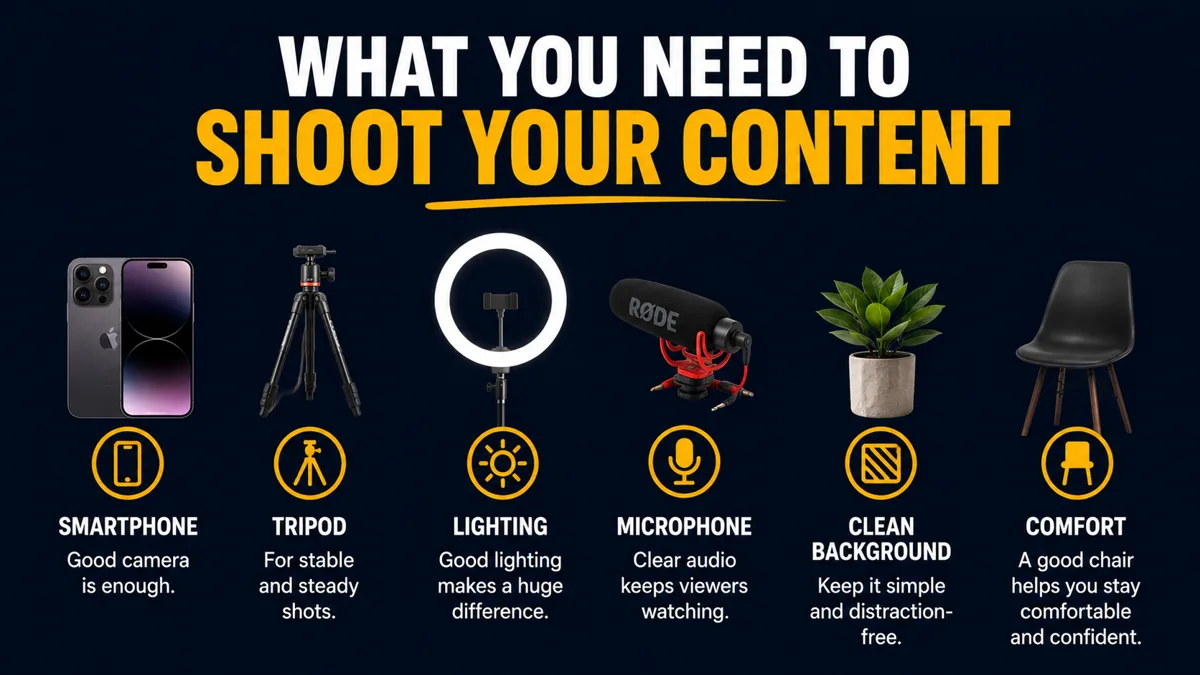
The video equipment you need to shoot your content is smaller than you think: a good external mic, a recent iPhone, two cheap lights, a MagSafe tripod and CapCut. Audio first, image second. Everything else — professional camera, background light bar, second angle — is an upgrade you earn once you're consistent.
By Arnaud Utille — Founder, The Alpha Omega Hub · Published November 20, 2026
What video equipment do you actually need to shoot your content?
Start with an external mic with noise cancellation (good DJI mics run around $100 on Amazon), a recent iPhone recording 1080p at 30 frames per second, two softbox lights at roughly $30–$40 each, a MagSafe tripod, CapCut for editing and an iCloud+ plan at about $10 per month for storage and sharing. That setup covers strategy-to-post for most local businesses.
What does your equipment list depend on?
Three things decide your kit: your current level, how minimalistic you want the setup to be, and how professional you want the content to look. A Tampa restaurant owner filming himself twice a week does not need what a full production day needs. Buy for the level you're actually shooting at, not the one you imagine.
Why is the microphone the first thing to buy?
The microphone is the single biggest quality upgrade for the money. Bad audio kills a video faster than bad image — people will forgive a soft picture, never muddy sound. Choose a mic with noise cancellation. When filming with an iPhone, use mics that connect directly through USB-C: the sound is recorded with the video, so there's no separate audio to synchronize in editing, and the whole process gets easier.
Use a lavalier (clip-on) mic for talking-head content and a shotgun mic for interviews and b-roll. Before every recording, confirm three things: the mics are charged, properly connected, and actually working. A DJI Mic Mini kit (2 transmitters, 1 receiver, charging case) is the safe default.
Is an iPhone enough to shoot short-form content?
Yes. A recent iPhone is enough to begin — we can tell with the eye whether footage came from an iPhone or something else, and for short-form it holds up. No need for a DSLR before you're consistent. Record at 1080p / 30fps: it's convenient to record, store, transfer and edit. Upgrade to 4K for better image quality, but stay at 30fps — the human eye sees at roughly 33 frames per second, so 30 looks natural while higher frame rates can look artificial. Don't record in HDR (it creates problems in editing software), and you don't need Log either. Note that 4K eats storage fast, so plan for an extra battery and space before the shoot.
Which iPhone camera settings should you turn on?
- Grid — helps with framing, positioning the subject and composing the shot.
- Level / orientation line — confirms the phone is actually straight.
- Cinematic mode — for face-to-camera videos or when the background doesn't matter; it blurs the background and looks more professional. Any iPhone from the 15 or 15 Pro generation onward handles it.
- 0.5× — when recording a person moving at close range.
A professional camera is an optional upgrade for people who want to take production more seriously — not a starting requirement.
What lighting do you need to shoot indoors?
When filming indoors with an iPhone, use external lights. They generally cost $30 to $40 each and we recommend buying two: one light alone creates unbalanced lighting, two give you a balanced, professional image. Natural light works too — a window facing you can replace a light kit for free — and a reflector or even a white foam board fills shadows without buying more lights.
For background, shoot in Cinematic mode so the studio or office stays recognizable but blurred, then add a standalone background light. A standing light bar instantly lifts the background, and when possible match its color to your branding. Keep the background itself clean, simple and uncluttered.
Minimal setup vs upgraded setup
| Minimal setup | Upgraded setup |
|---|---|
| DJI mic with noise cancellation (~$100), USB-C into the phone | Lavalier for talking heads + shotgun for interviews and b-roll |
| Recent iPhone, 1080p / 30fps, no HDR, no Log | 4K at 30fps, or a professional camera |
| Window light or one lamp | Two softbox lights ($30–$40 each) + background light bar in brand colors |
| MagSafe tripod | Tripod + second phone or camera for a multi-cam angle |
| CapCut | Premiere or Final Cut |
| Phone storage + one spare battery | iCloud+ (~$10/mo), SD cards, organized albums per shoot |
Do you need a tripod and a teleprompter?
Yes to both. A tripod or phone stabilizer — even a cheap one — removes shaky, unwatchable footage. With an iPhone, use a MagSafe-compatible tripod: you attach and remove the phone in a second instead of fighting a clamp, and traditional clamps get damaged after repeated use. MagSafe tripods are affordable, convenient, good quality and easy to use if you have a MagSafe case.
A teleprompter app helps you deliver a prepared script naturally without memorizing everything. Search "teleprompter" in the App Store on iPhone; on iPad we recommend the Teleprompter app, which lets you read your script while recording. It's the fastest fix if you're stressed on camera.
How should you store and share your footage?
Get an Apple iCloud+ subscription — roughly $10 per month, and it doubles as personal photo storage. On each shoot, create a new album, add every video from that shoot to it, and let iCloud sync automatically. Then share the album with your editor. You don't need a shared album unless several people upload directly; when someone else films, have them AirDrop the footage to you, add it to a normal album, hit share and create an iCloud link (which requires iCloud+).
To stay organized, use the Photos app filter for content that isn't in an album yet: open the filters in your library, select that option, and you'll see only what still needs sorting. Review it, file it into the right album, and it disappears from the unsorted view. For editing, CapCut is enough for anyone short on time — Premiere or Final Cut only if your budget and skill justify it.
What do we bring to a Tampa Bay shoot?
When we film for a Clearwater clinic, a St. Pete restaurant or a Tampa contractor, we show up with the full setup — mics, lights, tripods, teleprompter, multiple angles — because that's the point of hiring us. Strategy, concepts, scripts, filming, talent and editing are handled in-house: 10 tailored short-form videos, first versions within 10 days after the shoot. If you'd rather stop buying gear and just get content, book a call with us.
📚 Related Articles
❓ FAQ
What should I buy first?
A microphone. Bad audio kills videos faster than bad video, and a good DJI mic with noise cancellation is around $100.
Should I film in 4K or 1080p?
Start at 1080p/30 — easy to record, store, transfer and edit. Move to 4K for better image quality, but keep 30fps so the motion still looks natural.
Do I need a professional camera?
No. A recent iPhone is enough to begin. A professional camera is an optional upgrade once you're consistent and want higher production quality.
How many lights do I need?
Two. One light on its own creates unbalanced lighting; two $30–$40 softboxes give a balanced, professional image. A background light bar is a bonus.
The Alpha Omega Hub is a short-form vertical content agency in Tampa Bay, Florida. We create customized short-form videos for local B2C businesses — strategy, concepts, scripts, filming, talent, and editing, all in-house.
Book a call